Active Profile
Check which Git profile is currently active.
Usage
gpx current
Options
| Option | Description |
|---|---|
--json | Return structured JSON output |
Examples
Display active profile (Global only)
When only a global profile is active:
gpx current
Expected output:
Active profile: work
  Name:   Ada Lovelace
  Email:  ada@company.com
  Scope:  global
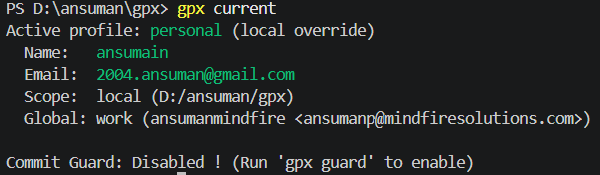
Display active profile (Local override)
When a local profile is set inside a repository:
gpx current
Expected output:
Active profile: freelance (local override)
  Name:   A. Lovelace
  Email:  ada@clientco.com
  Scope:  local (~/projects/client-app)
  Global: work (Ada Lovelace <ada@company.com>)
Display active profile (With Commit Guard)
If the repository has been guarded with gpx guard:
gpx current
Expected output:
Active profile: work (local override)
  Name:   Ada Lovelace
  Email:  ada@company.com
  Scope:  local (~/projects/company-app)
  Global: work (Ada Lovelace <ada@company.com>)

Commit Guard: Enabled ✓ (Locked to: 'work')
Structured JSON Output
gpx current --json
Expected output:
{
  "success": true,
  "data": {
    "active": {
      "profile": "work",
      "scope": "local",
      "auth_method": "ssh"
    },
    "global": {
      "profile": "personal",
      "name": "Alan Turing",
      "email": "alan@gmail.com",
      "signingKey": null
    },
    "local": {
      "profile": "work",
      "name": "Ada Lovelace",
      "email": "ada@company.com",
      "signingKey": null
    },
    "guard_status": "pass",
    "guard_message": "Enabled ✓ (Locked to: 'work')"
  }
}
NOTE
guard_statuscan be"pass","warn", or"fail"."fail"occurs when thepre-commithook is installed, but the repository is missing thegpx.expectedprofileconfiguration (meaning you should rungpx guardagain).
What happens behind the scenes
gpx checks your current context by:
- Reading
~/.gpx/active.jsonto determine the globally active profile. - Reading
.git/config(if inside a repository) to see if a local identity override is set. - Checking the repository's
.git/hooks/pre-commitscript to see if the Commit Guard is active.