Add Profile
Create a new profile with either SSH or PAT (HTTPS) authentication.
Usage
gpx add <profile_name>
Options
| Option | Description |
|---|---|
--auth-method [ssh/pat] | The authentication method to use for this profile |
--display-name [name] | The name that will appear on your Git commits |
--email [email] | The email that will appear on your Git commits |
--ssh-key [path] | Path to an existing SSH private key to use |
--generate-ssh | Automatically generate a new SSH key pair for this profile |
--gpg-key [key] | GPG key ID for signing commits |
--signing | Enable GPG commit signing |
--no-interactive | Disable prompts (useful for scripts and CI) |
Examples
Interactive Mode
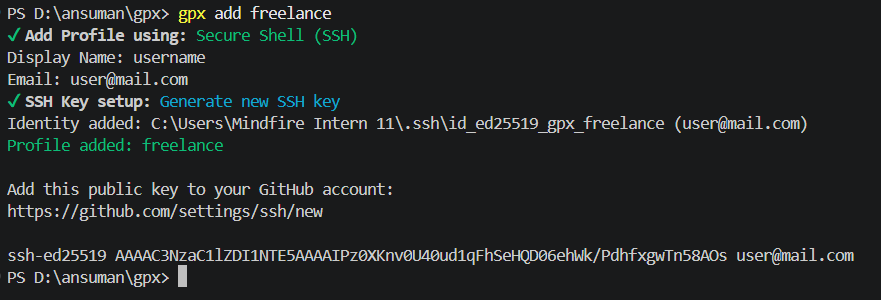
The easiest way to add a profile is interactively. gpx will prompt you to select an authentication method, enter your name and email, and either generate an SSH key, select an existing one, or enter a PAT.
gpx add work
Non-Interactive SSH Profile (Generate new key)
gpx add work \
  --auth-method ssh \
  --display-name "Ada Lovelace" \
  --email "ada@company.com" \
  --generate-ssh \
  --no-interactive
Non-Interactive SSH Profile (Use existing key)
gpx add personal \
  --auth-method ssh \
  --display-name "Alan Turing" \
  --email "alan@gmail.com" \
  --ssh-key ~/.ssh/id_ed25519_personal \
  --gpg-key ABC123DEF456 \
  --signing \
  --no-interactive
Non-Interactive PAT Profile
gpx add freelance \
  --auth-method pat \
  --display-name "Ada Freelance" \
  --email "ada@clientco.com" \
  --no-interactive
You will be securely prompted for your PAT during setup, or you can set it later using gpx pat set freelance
What happens behind the scenes
When you add a new profile:
- For SSH profiles: gpx registers the new identity. If you chose to generate an SSH key, it creates an
id_ed25519key pair. It then creates a dedicatedHostblock in~/.ssh/configso SSH automatically knows to use this key when cloning via the gpx host alias. - For PAT profiles: gpx validates your PAT against the GitHub API, retrieves your GitHub username, and securely stores the PAT in your OS native credential manager (macOS/Linux) or a secure per-profile JSON file (Windows).
- The profile details are saved to
~/.gpx/profiles.json.
Related commands
gpx ls- List all saved profiles.gpx edit- Edit the details of an existing profile.gpx remove- Delete a profile.