Vite + React Starter
The Vite + React Starter sets up a lean, instantly ready React workspace optimized for Ignix UI:
- Vite 5 with esbuild bundling + instant HMR (<100 ms cold start)
- React 18 + TypeScript + strict compiler options
- Tailwind CSS pre-wired with Ignix theme tokens and plugin globs
ThemeProviderwrapping the root component for light/dark + theme persistence- ESLint (
@typescript-eslint,react-hooks,react-refresh) + Prettier (Tailwind plugin) - Git-friendly
.gitignore, PostCSS, and Ignix config out of the box - Minimal dependencies so components stay tree-shakeable
Use it whenever you need a fast SPA baseline that already understands Ignix theming.
Installation Methods
- npm
- Yarn
- npx
npm install -g @mindfiredigital/ignix-cli
yarn global add @mindfiredigital/ignix-cli
npx @mindfiredigital/ignix-cli
Usage Modes
- Interactive
- Direct
Run the CLI and choose Starters Template → Vite + React (TypeScript + Tailwind + HMR):
ignix
The interactive mode provides a beautiful, guided interface with the following options:
- 🚀 Initialize Ignix UI - Set up your project
- ➕ Add components - Add components to your project
- 📋 List components - View available components
- 🎨 Manage themes - Configure and manage themes
- 📦 Starters Template - Generate a new starter template
- 🚪 Exit - Close the CLI
Choose the option Starters Template and press Enter.
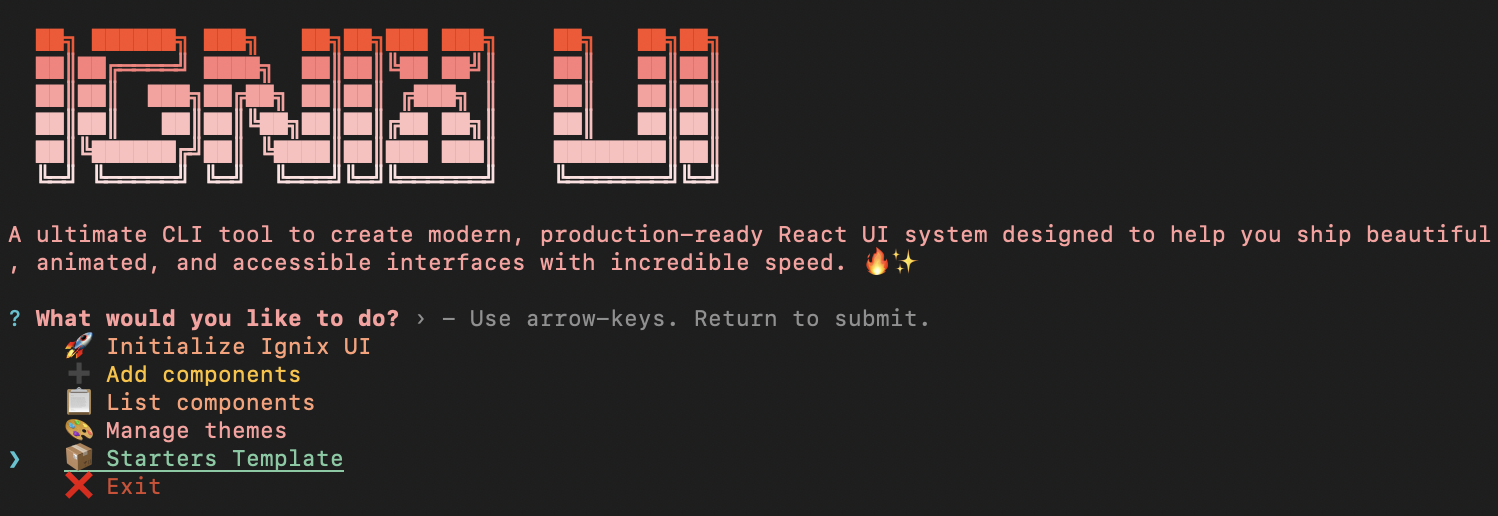
Then select Vite + React (TypeScript + Tailwind + HMR) from the list of available starters.

Skip the menu and scaffold immediately:
ignix vite-react
What the CLI does
- Warns if the target directory is not empty
- Writes
package.json,tsconfig.json,tsconfig.node.json, andvite.config.ts - Configures Tailwind, PostCSS, ESLint (CJS), Prettier, and Ignix registry defaults
- Generates
src/withmain.tsx,App.tsx,index.css, andcomponents/ui - Injects
ThemeProviderinsideApp.tsxfor theme persistence + OS sync - Creates
ignix.config.js,.gitignore, and Vite'svite-env.d.ts - Initializes git and installs dependencies via your detected package manager
Generated Structure
.
├─ src/
│  ├─ main.tsx          # Entry point mounting <App />
│  ├─ App.tsx           # ThemeProvider + welcome checklist
│  ├─ index.css         # Tailwind layers + CSS variables
│  ├─ vite-env.d.ts     # Vite client types
│  └─ components/ui/    # Ignix components land here
├─ index.html           # Vite HTML shell
├─ vite.config.ts       # React plugin, alias '@/*', tuned HMR(Hot Module Replacement)
├─ tailwind.config.js   # Ignix-aware tokens + content globs
├─ postcss.config.js    # Tailwind + autoprefixer
├─ tsconfig.json        # Strict TS + '@/*' alias
├─ tsconfig.node.json   # Node types for Vite config
├─ .eslintrc.cjs        # TS + react-hooks + react-refresh rules
├─ .prettierrc / .prettierignore
└─ .gitignore
Key Integrations
- ThemeProvider:
App.tsxwraps the UI, enabling theme persistence, OS-aware mode switching, and plug-and-playThemeSwitcher. - Tailwind CSS: ships with Ignix CSS variables (e.g.,
--primary) and globs that includenode_modules/@mindfiredigital/ignix-ui. - TypeScript: strict compiler options,
@/*alias, isolated modules, and Vite-specifictsconfig.node.jsonwith Node types. - Tooling: ESLint + Prettier + PostCSS configured so
npm run lint/npm run formatwork day one. - Performance: Vite dev server boots in under a second, uses optimized dependency pre-bundling, and tree-shakes unused Ignix components.
Scripts
| Script | Description |
|---|---|
npm run dev | Starts Vite dev server with fast HMR |
npm run build | Type-checks and builds the app |
npm run preview | Serves the production build locally |
npm run lint | Runs ESLint with the bundled config |
npm run format | Formats files using Prettier + Tailwind plugin |
Next Steps
cd your-app && npm run dev- Add UI primitives via
npx ignix add button - Browse/install themes using
npx ignix themes list - Deploy to your preferred platform (Netlify, Vercel, Render, etc.)