Introduction
DeepScanBot is a web crawler designed to scan websites, discover pages, and generate detailed reports. It runs as a single binary with no runtime dependencies, supports JSON and text output, and handles the complexities of web crawling automatically.
What Does DeepScanBot Do?
You give it a URL and it crawls the site by following links, respecting robots.txt, handling rate limits, and producing a report of everything it found. You control how deep it goes, how fast it crawls, and what content types to include.
- Crawls websites by following internal links up to a configurable depth
- Respects robots.txt rules with an option to bypass when needed
- Handles rate limits with automatic retry and exponential backoff
- Filters content by MIME type for targeted crawling
- Exports results in structured JSON or text formats
Who Is It For?
- Security Researchers - Map out website structure and identify exposed endpoints
- SEO Specialists - Discover all pages, find broken links, analyze site structure
- QA Engineers - Verify page availability, test website coverage
- Data Analysts - Collect structured data from websites
- DevOps Engineers - Monitor website health, validate deployments
Quick Start
The fastest way to get started:
npm install -g @mindfiredigital/deepscanbot

deepscanbot scan https://example.com
deepscanbot scan https://example.com depth=3 --json
deepscanbot --version
deepscanbot doctor
No additional runtime dependencies. The npm package installs the correct binary for your platform.
Key Features
- Concurrent Crawling - Multi-threaded crawling with configurable concurrency, per-host rate limiting, and CPU-aware auto-scaling
- Robots.txt Compliance - Automatically respects robots.txt rules with an option to bypass
- Retry & Rate-Limit Handling - Automatic retry with exponential backoff and Retry-After header parsing
- Rich Output - JSON or text reports with detailed summaries, status code distribution, and skip reason breakdowns
- Sitemap Discovery - Auto-discover and crawl URLs from sitemap.xml, including nested sitemap indexes
- Content-Type Filtering - Filter downloads by MIME type, enforce page size limits
- Proxy Support - Route traffic through HTTP/HTTPS proxy servers
- Resume Mode - Resume interrupted crawls without recrawling already visited URLs
- Cross-Domain Crawling - Optionally follow links to external domains
- TLS Options - Disable TLS verification for self-signed certificates
Note: The tabs below show example outputs of DeepScanBot in action. See the Scanning Guide for additional example outputs.
See It In Action
- Terminal Output
- Text Report
- JSON Output
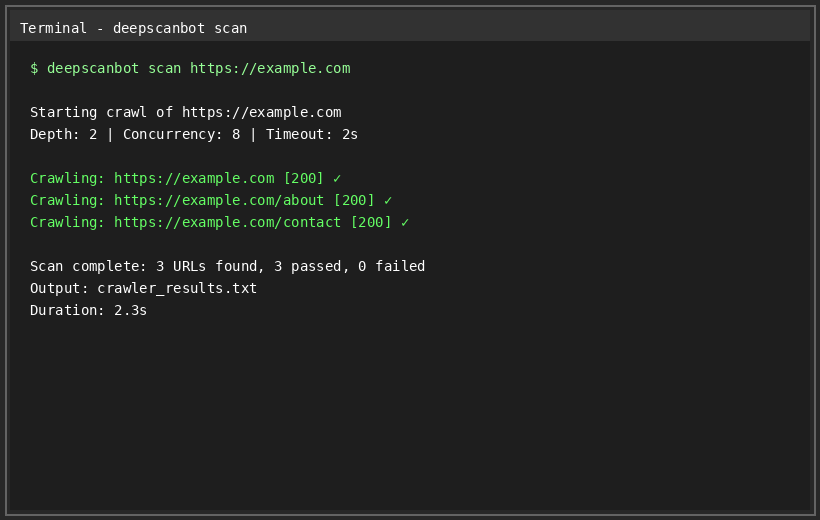
Real-time terminal output showing DeepScanBot crawling a website with progress indicators and results summary.
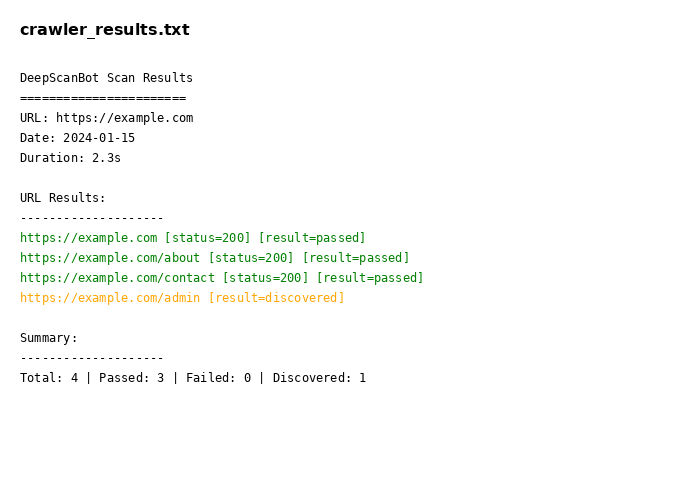
Human-readable text report with color-coded results, status codes, and detailed summary statistics.
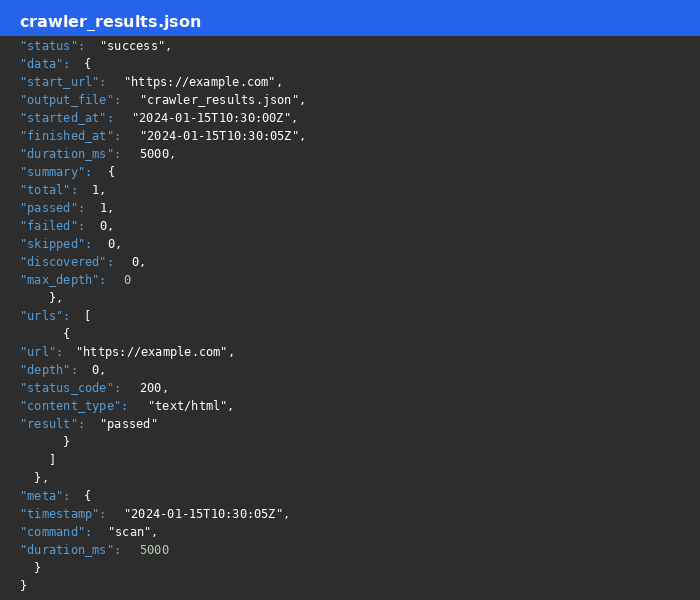
Structured JSON output perfect for automation, scripting, and integration with other tools.
Note: These are example outputs. Run
deepscanbot scan https://example.comto see it in action on your own website.
Why DeepScanBot?
| DeepScanBot | Other Crawlers | |
|---|---|---|
| Platform | Single binary, no runtime deps | Often requires Python/Node runtime |
| Concurrency | Built-in, configurable | Often limited or complex setup |
| Rate Limiting | Per-host plus global semaphores | Manual or absent |
| Robots.txt | Automatic plus bypass option | Varies |
| Retry Logic | Exponential backoff plus Retry-After | Often basic or missing |
| Output | JSON or text with full analytics | Usually basic |
| Resume Mode | Built-in | Rare |
| Sitemap | Auto-discovery plus nested | Rare |
| Exit Codes | Standardized no issues / issues found | Inconsistent |
Comparison with Similar Tools
DeepScanBot shares features with several established crawlers, but is designed to be simple to deploy, safe for CI/CD, and rich in structured output. The table below highlights how it differs from common alternatives.
| DeepScanBot | Screaming Frog | Wget | Scrapy | HTTrack | |
|---|---|---|---|---|---|
| Deployment | Single binary, zero runtime deps, npm-installable | Desktop GUI app (Java) | CLI utility | Python framework | Desktop GUI app |
| License / Cost | Free, open source | Commercial (free tier) | Free (GPL) | Free (BSD) | Free (GPL) |
| CI/CD friendly | Yes — headless, --no-input, standardized exit codes | No — requires GUI/session | Partial | Requires custom runner | No |
| JSON output | First-class (--json global flag) + jq-friendly | Limited / app-dependent | Limited | Custom pipelines | No |
| Concurrency | Built-in, configurable, CPU-aware | Yes | Single-threaded (-e robots=off etc.) | Framework (you build it) | Limited |
| Rate limiting | Per-host + global semaphores | Built-in | Minimal | Manual | Partial |
| Robots.txt | Automatic + bypass option | Built-in | -e robots=off | Via middleware | Built-in |
| Retry / backoff | Automatic exponential backoff + Retry-After | Partial | --tries | Manual | Basic |
| Sitemap discovery | Built-in, incl. nested indexes | Built-in (SEO focus) | No | Via extension | No |
| Resume mode | Built-in | No | -c (partial) | No | Yes |
| Cross-domain follows | Optional | Optional | No | Custom | Option |
| Proxy / TLS options | Yes | Yes | Yes | Yes | Yes |
Key takeaways
- Free, open-source, and CI/CD-first — based on the criteria in the table above (License/Cost and CI/CD friendliness), DeepScanBot is the only option rated fully CI/CD-friendly ("Yes": headless,
--no-input, standardized exit codes) while remaining free and open source. It ships as a single dependency-free binary that never hangs on user input. - It provides first-class JSON output (
--json) and standardized exit codes, making it easy to script, monitor, and integrate into pipelines. - Screaming Frog and HTTrack are powerful but GUI-oriented; Wget is minimal; Scrapy is a framework that requires building your own crawler.